Minecraft Chat Safety Tips: A Parent’s Guide to Safer Gaming
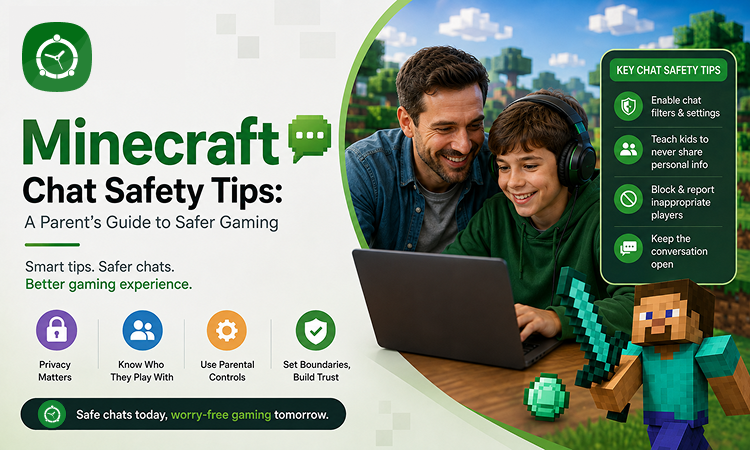
Minecraft is more than a game. For many children, it is a place to build, explore, collaborate, and connect with friends. Multiplayer servers and in-game chat can make the experience even more social—but they can also introduce children to conversations and people parents may not know.
That is why Minecraft chat safety should be part of every family’s digital safety routine.
The good news? Parents do not have to monitor every conversation or take away the fun. With the right settings, open communication, and a little help from parental control tools like FamilyTime, parents can give children more freedom while helping them stay safer online.
Why Minecraft Chat Safety Matters
Minecraft allows players to communicate in different ways, including text chat, voice communication through certain servers or platforms, and interactions with other players.
While most gaming conversations may be harmless, children can sometimes encounter:
- Inappropriate language or mature conversations
- Cyberbullying and teasing
- Unknown players asking personal questions
- Scams or suspicious links
- Attempts to move conversations to other apps
- Requests for photos, personal information, or real-world details
- Pressure to keep conversations secret from parents
Children may not always recognize when a conversation has crossed a safety boundary. A friendly player can also be a stranger, so teaching children how to respond is just as important as using parental controls.
1. Teach Children the “Stranger = Stranger” Rule
A player may seem friendly, funny, or helpful, but your child still may not know who is behind the screen.
Explain that an online friend is still someone they do not know in real life unless you have verified otherwise.
Encourage children not to share information such as:
- Full name
- Home address
- School name
- Phone number
- Passwords
- Daily routines
- Family financial information
- Personal photos
A simple rule can help: If you would not tell a stranger at the park, do not tell them in Minecraft chat.
2. Help Kids Recognise Unsafe Conversations
Children should know that they can leave a conversation whenever something feels uncomfortable.
Teach them to watch for warning signs such as someone who:
- Asks for personal information
- Wants to know where they live or go to school
- Requests photos or videos
- Offers gifts or in-game rewards in exchange for information
- Uses threats or insults
- Encourages them to hide conversations from parents
- Wants to move the conversation to another messaging platform
Make it clear that they will not be punished for telling you about an uncomfortable interaction.
That reassurance is important. Children are more likely to report problems when they know they will not immediately lose their gaming privileges.
3. Use Minecraft’s Privacy and Communication Settings
Minecraft and the platform on which it is played offer settings that can help parents manage communication and multiplayer experiences.
Take some time to review the privacy, multiplayer, communication, and account settings available for your child’s version of Minecraft and gaming platform.
Don’t simply change the settings and forget about them. Check them periodically, especially after updates or when your child starts playing on a new platform or server.
4. Be Careful With Public Multiplayer Servers
Public servers can introduce children to players they have never met.
Before allowing your child to join a server, consider:
- Who operates the server?
- Is there active moderation?
- What are the server’s community rules?
- Is chat monitored?
- Is the server appropriate for your child’s age?
- Can players send private messages?
- Does the server encourage purchases or interactions with strangers?
For younger children, private worlds or multiplayer sessions with people the family knows may be a safer starting point.
5. Teach Kids How to Handle Cyberbullying
Minecraft can be a creative and collaborative experience, but disagreements can happen.
If someone insults, threatens, excludes, or repeatedly targets your child, teach them not to retaliate.
Instead, encourage them to:
- Stop responding.
- Leave the situation if possible.
- Block or mute the player when the platform allows it.
- Report inappropriate behaviour.
- Tell a trusted adult.
If necessary, keep screenshots or other evidence of serious harassment.
The goal is not to teach children to “win” an online argument. It is to help them recognize when walking away is the safer choice.
6. Create a “Come Tell Me” Rule
One of the best Minecraft chat safety tools is an open relationship between parents and children.
Tell your child:
“If something online makes you uncomfortable, you can always come to me—even if you broke a rule.”
This can make a major difference.
Instead of focusing only on what children should never do, talk about what they should do when something goes wrong. Practice simple responses such as:
“I don’t share that information.”
“I’m going to leave this chat.”
“I need to ask my parent first.”
These phrases give children an easy way to handle uncomfortable situations without feeling pressured to continue the conversation.
7. Set Healthy Gaming Boundaries With FamilyTime
Chat safety is only one part of a child’s digital well-being. Parents may also want to understand when, where, and how long their children are using gaming devices.
This is where FamilyTime can complement your family’s Minecraft safety plan.
With FamilyTime, parents can create screen-time schedules, set limits, monitor digital activity, and manage device use from a parent-focused dashboard. These tools can help families establish healthy gaming routines without making every gaming session a confrontation.
For example, parents can create a schedule that allows Minecraft after homework or chores while automatically limiting gaming during bedtime or school hours.
Explore FamilyTime parental controls
The goal isn’t to spy on children. It is to create appropriate boundaries and help parents stay involved in their children’s digital lives.
8. Make Online Safety a Regular Conversation
A single conversation about Minecraft chat safety is not enough.
Gaming communities, features, and online risks can change over time. As children get older, they may also gain access to new servers, platforms, and communication tools.
Consider having a short family check-in every few weeks:
- Who are you playing with?
- Which servers do you enjoy?
- Has anyone said something that made you uncomfortable?
- Do you know how to block and report someone?
- Have you received any strange messages or links?
- Is there anything about gaming that you want help with?
Keep these conversations relaxed rather than turning them into interrogations.
9. Balance Safety With Independence
Children need opportunities to develop good digital judgment.
Instead of trying to control every interaction, gradually teach children how to make safe decisions themselves.
For younger children, parents may need more direct supervision and stricter communication settings. As children demonstrate responsible behaviour, parents can gradually give them more independence while continuing to check in.
Parental controls such as FamilyTime can support this approach by helping parents establish age-appropriate boundaries while children develop healthy digital habits.
A Minecraft Safety Checklist for Parents
Before letting your child play multiplayer Minecraft, make sure you have:
- Reviewed the relevant privacy and communication settings
- Discussed what information should never be shared
- Explained how to block and report players
- Talked about cyberbullying and inappropriate conversations
- Discussed the risks of interacting with unknown players
- Checked the servers your child wants to join
- Established gaming and bedtime limits
- Told your child they can come to you about anything uncomfortable
- Reviewed their gaming habits regularly
Final Thoughts
Minecraft should be a place where children can be creative, curious, and have fun—not a place where they feel pressured or unsafe.
Parents cannot control every conversation their children may encounter online, but they can give children the knowledge and tools to handle those situations.
Start with age-appropriate privacy settings, teach children to recognise red flags, encourage them to speak up, and establish healthy gaming boundaries. Using a parental control solution like FamilyTime can add another layer of support by helping families manage screen time and digital routines.
The most effective approach is not simply “block everything”. It is helping children learn how to play safely, communicate responsibly, and make smart choices online.